Deep dive: Stripe simulator vs mock vs sandbox
By Henry Starman ·
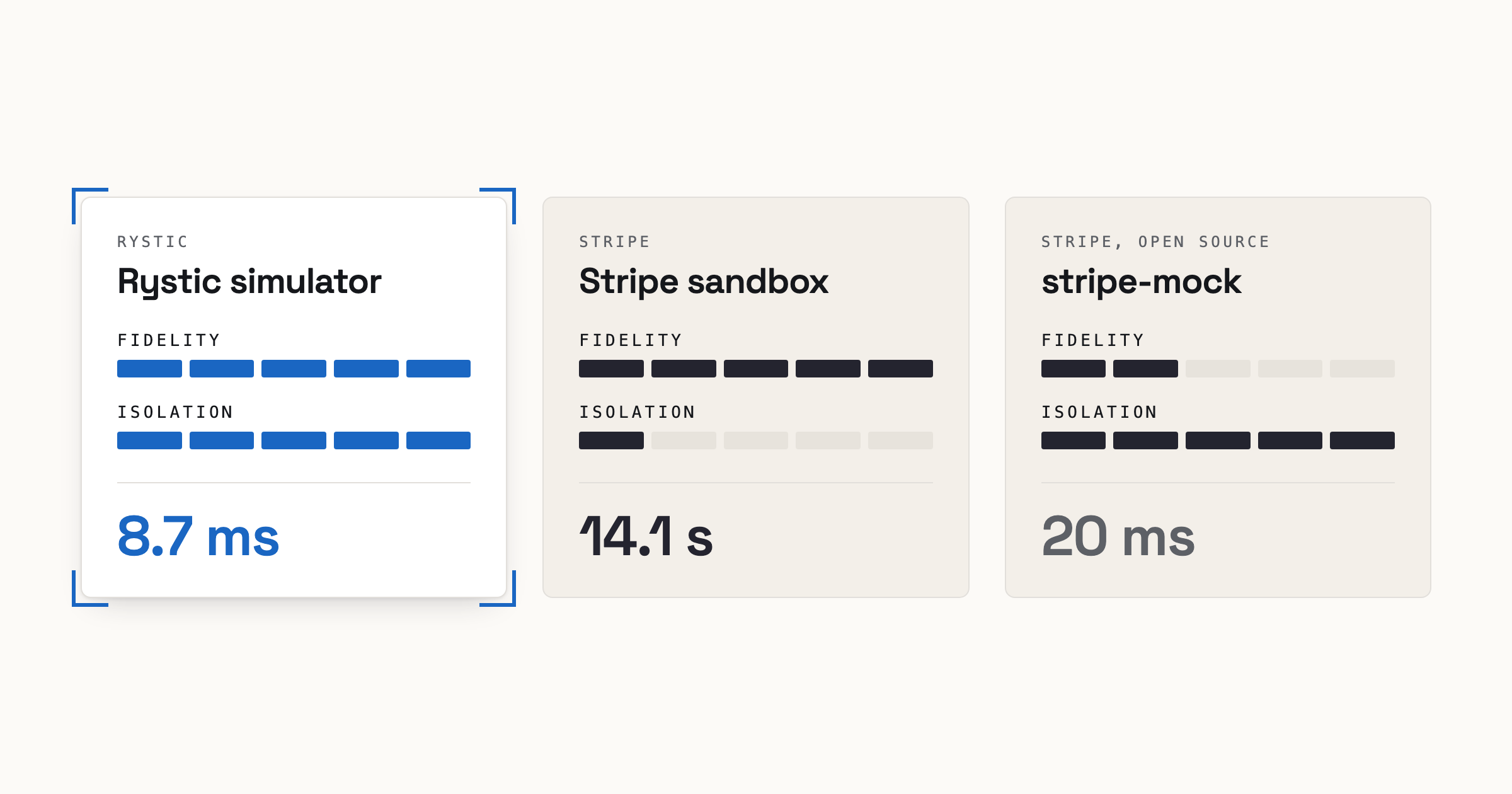
A Stripe test in CI needs two things: answers that match Stripe’s, and an environment each job can have to itself. Stripe offers two options, a sandbox and stripe-mock, and each gives you only one: the sandbox gives fidelity, stripe-mock isolation. The Rystic Stripe simulator grants both.
Stripe’s advice is a separate sandbox for CI, reused across test runs [6][7], so every pull request’s tests share its data, its webhook endpoints and its limit of 25 requests a second [3], and Stripe says to call it “infrequently” [4]. In our stress test, parallel CI jobs slowed each other down and large test suites ran into the clock and rate limits.
stripe-mock scales well, but it lacks state. So a bug that double-charges or double-refunds passes a stripe-mock test.
The Rystic Stripe simulator outperformed the sandbox in a simulated CI stress test and grants test isolation the sandbox cannot. It keeps state, so the double-charge and double-refund bugs that pass a stripe-mock test fail against it. What it lacks is API breadth, as it models only about a third of Stripe’s API.
We ran two Stripe workflows, billing and payments, against the Rystic Stripe simulator, the Stripe sandbox and stripe-mock. The simulator gave the sandbox’s answer on 15 of 16 steps, missing only one event, which it didn’t send. stripe-mock matched only 5. Then we stress-tested the simulator and the sandbox with many clients at once and with larger customer bases.
So run the simulator in CI on every commit, keep the sandbox for one smoke test before you ship, and use stripe-mock to save money or to check that v1 API requests are well formed.
Every script and result is public; you can rerun all of it with your own Stripe test-mode key.
The tools
The Rystic Stripe simulator is a local server that keeps state and runs Stripe’s logic for the operations it serves. We check it against real Stripe every day and publish how often it gives the same answer as Stripe, on success paths, error paths and undocumented behavior. The simulator models the 2026-06-24.dahlia API version.
The Stripe sandbox is real Stripe in test mode: the same API and rules, with no real money. Stripe notes it is not “a perfect stand-in for live API calls”, because the payment gateway is simulated [3]. It is the oracle that every other tool is scored against.
stripe-mock is Stripe’s open-source mock server and is used for running checks in CI. Its README says it “does not attempt to reproduce the behavior of the real Stripe API at all” and “is meant for basic sanity checks”. Stripe’s own SDK test suites use it “to help validate that the SDK hits the right URL and sends the right parameters” [1].
The workflows
Two workflows cover two common Stripe jobs: billing subscriptions, and taking payments and refunds.
Billing: A monthly subscription followed through its first renewal, the scenario Stripe’s own test clock guide walks through [5]. A test clock is a Stripe object that lets a test move a customer’s time forward.
- Create a product and a $20/month price.
- Create a test clock frozen on 1 November 2026.
- Create a customer on the clock, with a Visa test card as its default.
- Subscribe the customer.
- Advance the clock to two hours past the first renewal, and poll it until it is ready.
- Read the subscription and its invoices.
- List the events the flow caused.
Every step should succeed and every expected event should fire.
Payments: A card payment’s full life: pay, retry, refund, decline. An idempotency key is a header that tells Stripe two requests are the same, so a retry never charges twice.
- Create a customer.
- Pay $50 by card through a PaymentIntent, then send the identical request again with the same idempotency key.
- Read the charge and its balance transaction, Stripe’s record of the fee and the net.
- Refund $20.
- Refund the rest.
- Try to refund a third time.
- Pay again with a card that is declined.
- List the customer’s charges.
- List the events the flow caused.
The retry in step 2 should change nothing, steps 6 and 7 should fail, and every other step should succeed and fire its events.
First we measure how each tool handles these flows. Then we stress-test the passing tools on simulated parallel CI runs and additional complexity.
How we measure
Each workflow is one Python script that sends identical requests to whatever base URL it is given.
For each step, the script records fields fixed in advance: statuses, error codes, amounts, invoice reasons, and each event type with its count. A tool matches a step when those fields equal the sandbox’s exactly.
How each tool ran:
The Rystic Stripe simulator: rystic run -version 0.0.18 stripe-twin, a customer release build.
The Stripe sandbox: fresh and empty before every run, so no leftover data could affect it.
stripe-mock: the official Docker image at tag v0.206.0 with default flags, as its README runs it.
Billing flow
All three tools passed the setup steps: product and price, test clock, customer. The simulator and the sandbox stored that state while stripe-mock stored nothing.
stripe-mock “reflects the values of valid input parameters into responses” [1]. The price came back as $20 only because the request said $20, and the clock advance in step 5 matched the same way. Those four echoes are stripe-mock’s 4 of 7.
Step 4, subscribing the customer, is where stateless answers break:
| Field | Rystic Stripe simulator | Stripe sandbox | stripe-mock |
|---|---|---|---|
| Subscription status | active | active | active |
| Period | 1 Nov to 1 Dec 2026 | 1 Nov to 1 Dec 2026 | Feb 2030 to Dec 2000 |
| First invoice reason | subscription_create | subscription_create | manual |
| First invoice status | paid | paid | draft |
| First invoice amount paid | $20 | $20 | $0 |
After the clock advance, step 6 reads the subscription and its invoices:
| Field | Rystic Stripe simulator | Stripe sandbox | stripe-mock |
|---|---|---|---|
| Period moved on one month | yes | yes | no |
| Invoices | 2 | 2 | 1 |
| First invoice | subscription_create, paid, $20 | subscription_create, paid, $20 | manual, draft, $0 |
| Renewal invoice | subscription_cycle, paid, $20 | subscription_cycle, paid, $20 | none |
Billing also fires the events your webhook handlers depend on. Stripe sent 29 events of 21 types: setup, the subscription, invoice.upcoming before the renewal, two invoices each created, finalized and paid, the two payments behind them, and the test clock’s own events. The simulator sent the same 21 types, each with Stripe’s count. stripe-mock sends no events.
The simulator’s server time was about 17 ms across the seven steps; the recorded wall time is 2.03 s because the harness polls the clock once a second and the simulator was ready on the second poll. The sandbox took 14.1 s, 9.8 s of it waiting on the clock.
Payments flow
A payments test should catch four bugs: a double charge on retry, a wrong refund, a refund of money that’s already gone, and a declined card treated as paid.
| Step | Rystic Stripe simulator | stripe-mock |
|---|---|---|
| 1. Create a customer | matches | matches |
| 2. Pay, then retry | matches | doesn’t take the payment; the retry makes a new one |
| 3. Fee and net | matches | not reached |
| 4–8. Refunds, declined card, charge list | matches | not reached |
| 9. Events | 10 of 11; charge.updated missing | not reached |
The simulator’s one miss is the charge.updated event. Stripe sends it when the balance transaction appears. The simulator attaches it once, so we’re updating it to attach after Stripe’s delay.
stripe-mock fails at step 2. It never takes the first payment, and it ignores the idempotency key, so the retry creates a second one. With nothing to refund, the script stops. The later steps would have failed anyway: stripe-mock will refund a charge that never existed. So a bug that double-charges or double-refunds passes a stripe-mock test.
The simulator took 20 ms. The sandbox took 8.4 s, 2.7 s of it waiting for the balance transaction.
Stress test
The flows above ran once, for one customer. CI and test suites run many jobs in parallel against Stripe at once, and real suites seed many customers and follow them for months. We chose the billing flow to scale both ways. There will be up to 50 clients at once, and up to 100 customers billed for up to 12 months. stripe-mock is left out of the stress test as it could not complete either base flow.
Multiple clients
Each client runs the seven-step flow from above. Stripe and Rystic each run as a single instance.
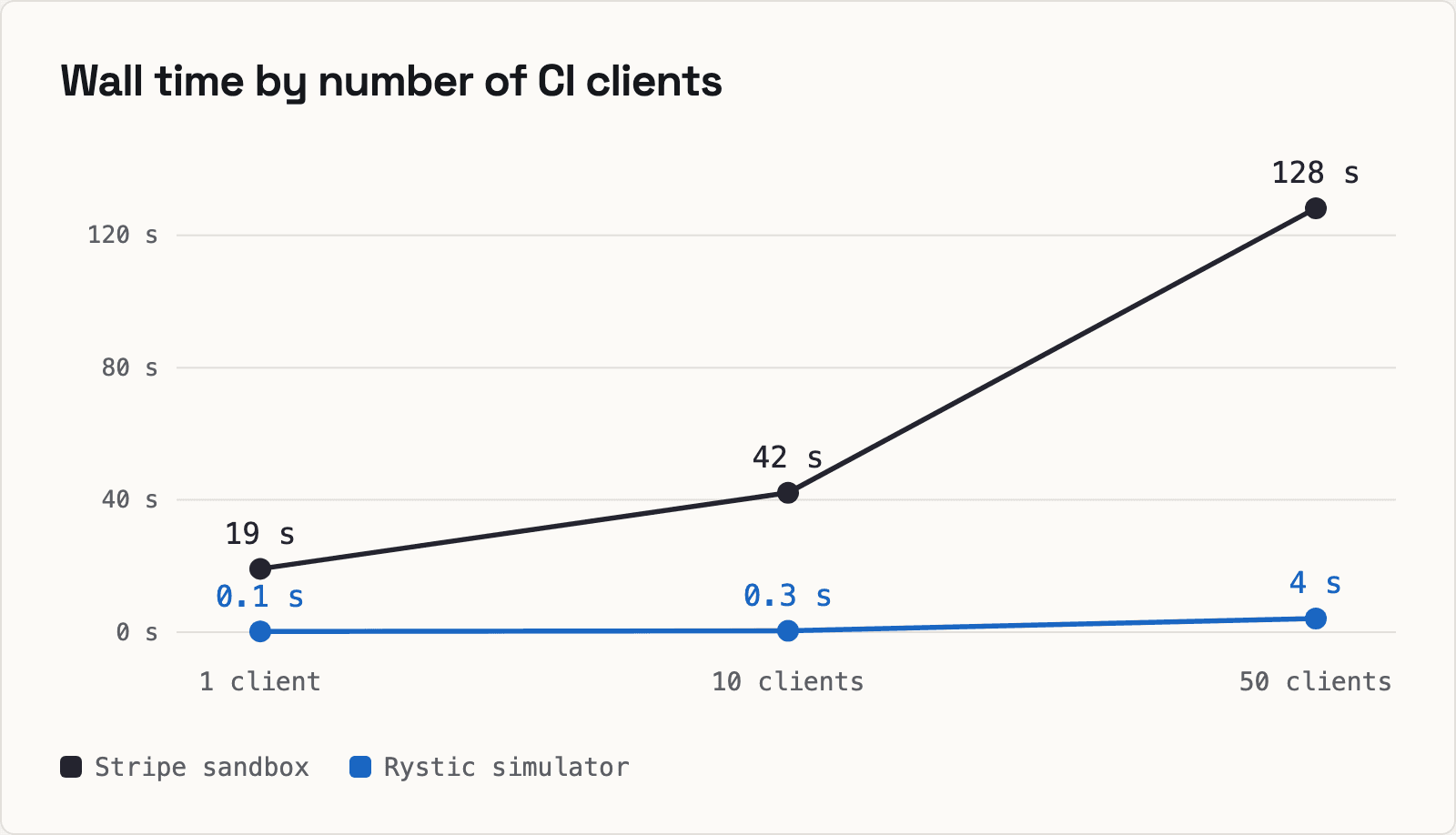
On the sandbox, every client added makes the others wait longer as all of them share the account’s clock processing. At 50 clients the sandbox needed 572 retries to complete. The Rystic simulator can run one instance per client, while Stripe allows at most 5 sandboxes per account.
Billing for one year
An advance moves a clock at most two billing intervals [5], so a year takes seven advances. A Stripe clock holds at most three customers, so 100 customers need 34 clocks, and each advance waits for all of them.
| Step | Stripe, 1 customer | Stripe, 100 customers | Rystic, 1 customer | Rystic, 100 customers |
|---|---|---|---|---|
| Setup | 3 s | 270 s | under 0.1 s | 0.1 s |
| All seven clock advances, 1 Nov 2026 to 1 Nov 2027 02:00 | 113 s | 2,458 s (41 min) | under 0.5 s | 1.5 s |
| Total, with checks | 116 s | 46 min | 0.4 s | 2.2 s |
| Subscriptions with 13 paid $20 invoices | 1/1 | 100/100 | 1/1 | 100/100 |
Both servers got every invoice right. On the sandbox, 41 of the 46 minutes for 100 customers were spent waiting for clocks.
Multiple clients × 100 customers
CI jobs that each seed 100 customers and bill them for one month, testing 1, 10 and 50 clients.
| 1 client × 100 customers | 10 clients × 100 customers | 50 clients × 100 customers | |
|---|---|---|---|
| Stripe: clients that finished | 1 of 1 | 9 of 10 | 4 of 50 |
| Stripe: clients stopped by 429s after ten tries | 0 | 1, while sending its advances | 34: 21 during setup, 13 at the advance |
| Stripe: setup per client, median | 274 s | 274 s | 437 s |
| Stripe: renewals paid | 100 of 100 | 900 of 1,000 | 514 of 5,000 |
| Stripe: wall time | 8.4 min | 34 min | timed out at the 40-minute limit |
| Rystic | 1 of 1 in 0.6 s, 100 renewals paid | 10 of 10 in 2.3 s, 1,000 renewals paid | 50 of 50 in 19 s, 5,000 renewals paid |
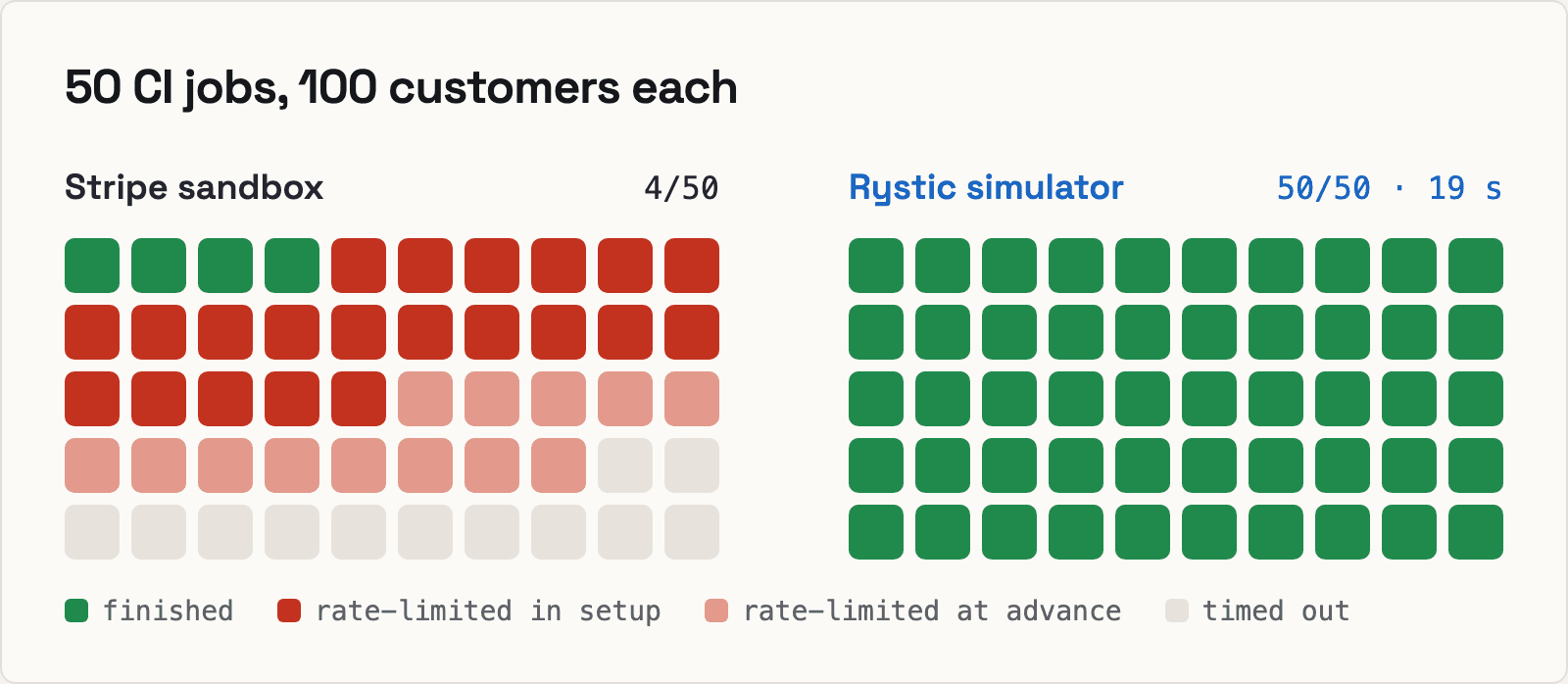
Ten clients set up as fast as one, so the time went to the clocks, which the sandbox served in no particular order. The sandbox jobs finished anywhere from 23 to 34 minutes in. One stopped after its advances were refused ten times in a row (the retry limit we set).
At 50 clients, setup itself ran into the rate limit, and two-thirds of the jobs were stopped before a single renewal. That run also left work behind. When it exited, 226 of its clocks were still advancing, and they didn’t stop until 23 minutes later. Until then they couldn’t be deleted, and they held up other runs.
Stripe provides at most 5 sandboxes per account [8]. In the best case where one sandbox handles one client, each would take 8.4 minutes to perform the 100-customer test. Additional clients degrade performance.
What this means
Turn up either axis and the sandbox’s time goes to clock processing that every job on the account shares and none can stop: 46 minutes for a year of 100 customers, and at 50 jobs, most never finish. The simulator ran each of these in seconds, with every renewal paid as on Stripe.
The three side by side
The simulator wins on speed and control, which is what CI needs; the sandbox wins on fidelity and breadth.
| Rystic Stripe simulator | Stripe sandbox | stripe-mock | Verdict | |
|---|---|---|---|---|
| Runs in CI | yes: no rate limit, one instance per job | no: 25 requests a second, shared state, no reset, at most 5 sandboxes per account | yes, without state | Simulator |
| Our two flows, answered as Stripe does | billing 7 of 7; payments 8 of 9 | oracle | billing 4 of 7; payments 1 of 9 | Simulator over stripe-mock |
| Fidelity on everything Stripe does | 99.1% of 1,813 daily checks, on the operations it serves | 100%, by definition | low by design | Sandbox |
| API breadth | 196 operations, 15 of them v2 | the whole API | 612 operations: all of v1, no v2 | Sandbox |
| Keeps state | yes | yes | no | Simulator and sandbox |
| Moving time forward | Stripe’s test clocks, plus its own clock (3.7 ms) | test clocks: 3 customers each, 9.8 s for a month here [5] | no | Tied on the renewal; simulator on speed |
| Billing flow time | 8.7 ms | 14.1 s | 20 ms, nothing renewed | Simulator |
| Payments flow time | 20 ms | 8.4 s | 10 ms, stopped at step 2 | Simulator |
| Per-call latency (median) | 0.06 ms GET, 0.10 ms POST | a network round trip | 0.06 ms; 0.16 ms in Docker | Simulator and stripe-mock |
| A year of billing, 100 customers | 2.2 s, every invoice right | 46 min, every invoice right | not run | Simulator |
| 50 CI jobs at once, 100 customers each | 50 of 50 in 19 s; 5,000 of 5,000 renewals | 4 of 50 before the 40-minute limit; 514 of 5,000 renewals | not run | Simulator |
| Rate limit | none | 25 requests a second [3] | none | Simulator and stripe-mock |
| Reset to a clean slate | one call | no reset | nothing to reset | Simulator |
| Runs offline | yes, on the Enterprise plan | no | yes | Simulator on Enterprise; stripe-mock |
The simulator runs stateful flows, clock included, at stripe-mock’s speed. With no rate limit, you can load test against it, which Stripe advises against in a sandbox [3]. More details on isolation, reset and webhooks in a future post.
Because the sandbox is the oracle, the simulator can match it on fidelity but never beat it. The simulator serves about a third of Stripe’s v1 operations, chosen by what our customers use.
When to choose which
The Rystic Stripe simulator, for CI and for agents. It runs on every commit, one isolated instance per job, with no rate limit and a reset between tests. It covers billing over time, stateful flows, declines, refunds, idempotency and events, and it holds up at scale. Offline use needs the Enterprise plan. Check what it covers before relying on it, and read its list of known disagreements.
The Stripe sandbox, for a final smoke check. It doesn’t fit well in CI as performance degrades with scale. Stripe recommends making real calls “infrequently to avoid rate limits” [4]. Run one smoke test against it before you ship, at most a few tests at a time on simple cases, and use it for anything the simulator doesn’t serve yet or that depends on Stripe’s real timing.
stripe-mock, for request shape. Does your code call the right endpoint with valid parameters? That is what Stripe built it for, and it covers all of v1, free and offline. If your code calls Issuing, Terminal, Tax or Connect’s v1 accounts, stripe-mock answers with the right shape where the simulator answers 404. You should not assert on its responses.
Run your own suite
Our two flows are a sample. The test that matters is the one your code needs. Point your suite at the simulator, the sandbox and stripe-mock, and see which failures are real.
If we ran a tool wrong or misread a result, open an issue in Rystic-Inc/rystic-benchmarks or email founders@rystic.ai.
Appendix
What we don’t simulate
The simulator serves 181 of the 612 v1 operations and 15 of the 32 v2 operations in Stripe’s current spec. We add operations as customers need them. We have no plans to support deprecated routes or v1 routes replaced by v2. Not yet served:
- Billing: coupons and promotion codes, tax rates and tax IDs, subscription schedules, quotes, invoice previews, sending an invoice, editing an invoice’s lines, and adjustments to a customer’s balance.
- Disputes: a dispute can be read but not answered. Submitting evidence, the file uploads it needs, and closing a dispute aren’t served.
- Connect: v1 connected accounts, their onboarding links and account sessions, transfers and application fees; on v2, account links, persons and account tokens. Creating, updating and closing a v2 account works.
- Saved cards in your frontend: ephemeral keys, customer sessions and confirmation tokens, which the mobile SDKs and the Payment Element use.
- Usage billing on v2: v2’s meter events and its high-volume event stream. v1 meter events work.
- Whole products: Issuing, Terminal, Treasury, Identity, Financial Connections, Climate, Reporting and Sigma.
- Legacy routes Stripe has replaced (no plans to support): Sources, Tokens, Plans, and cards and bank accounts added to a customer directly.
Reproduce our results
Everything is in Rystic-Inc/rystic-benchmarks:
harness/run_flow.py: the billing flow.harness/run_payments.py: the payments flow.harness/run_receipts.py: the six single calls each server got first.harness/compare_payments.py: scores each server against Stripe and merges the runs.- Results from every server in the recorded run, with IDs masked:
results/2026-10-20/. stress/: the stress test.concurrent_flows.pyruns many clients at once,billing_year.pya year of billing, andbilling100.pymany clients with 100 customers each. Its README gives the command behind each table.- The stress test’s recorded runs:
results/2026-10-24/.
git clone https://github.com/Rystic-Inc/rystic-benchmarks
cd rystic-benchmarks/stripe/harness

curl -fsSL https://www.rystic.ai/install.sh | sh        # ends by signing you in through the browser
rystic run -version 0.0.18 -d --port 0 stripe-twin      # prints its port
docker run -d --rm -p 12111:12111 stripe/stripe-mock:v0.206.0

export STRIPE_SECRET_KEY=sk_test_local  # the local servers take any test key
python3 run_flow.py --base-url http://127.0.0.1:PORT --label rystic --out flow-rystic.json
python3 run_flow.py --base-url https://api.stripe.com --key-file ~/stripe.env --label stripe --out flow-stripe.json
python3 run_flow.py --base-url http://127.0.0.1:12111 --label stripe-mock --out flow-mock.json
python3 compare_payments.py flow-stripe.json flow-mock.json flow-rystic.json --out flow.json
The Stripe line reads your own test-mode key from a file. It creates test-mode objects in the sandbox, and run_flow.py deletes its test clock, with the clock’s customer and subscription, when it ends. run_payments.py and run_receipts.py take the same flags.
The stress test runs from stress/, in the same shell:
cd ../stress

# Multiple clients
python3 concurrent_flows.py --flow billing --levels 1,10,50 --retries 10 \
   --base-url https://api.stripe.com --key-file ~/stripe.env --out clients-stripe.json
python3 concurrent_flows.py --flow billing --levels 1,10,50 --poll-s 0.05 --reset-between \
   --base-url http://127.0.0.1:PORT --out clients-rystic.json

# Billing for one year (add --customers 1 for one customer)
python3 billing_year.py --base-url https://api.stripe.com --key-file ~/stripe.env --out year-stripe.json
python3 billing_year.py --base-url http://127.0.0.1:PORT --out year-rystic.json

# Multiple clients x 100 customers (--clients 1, 10 or 50), and one simulator per client
python3 billing100.py --base-url https://api.stripe.com --key-file ~/stripe.env --clients 10 --out x100-stripe.json
for i in $(seq -w 0 49); do rystic run -version 0.0.18 -name c$i -d --port 0 stripe-twin; done
python3 multi_instance.py --prefix c --poll-s 0.05 --out clients-own-instance.json
python3 billing100.py --prefix c --clients 10 --out x100-rystic.json
Every request pins Stripe-Version: 2026-06-24.dahlia. The flows were recorded on 20 October 2026 and the stress test on 24 October 2026. One change was made in fairness to stripe-mock: it rejects payment_method_types[]=card on a PaymentIntent, which Stripe accepts [2], so the payments flow uses automatic_payment_methods[enabled]=true with allow_redirects=never instead.
Sources
- stripe-mock README
- stripe-mock#1648 , Stripe staff comment, October 2026
- Stripe rate limits : 25 requests a second in a sandbox, and a sandbox “not a perfect stand-in for live API calls”
- Stripe automated testing : mocks in CI and real calls “infrequently to avoid rate limits”
- Test clocks : the renewal recipe, limits and asynchronous advances
- Test your Billing integration : Best practices for testing in CI.
- Sandboxes : “Use separate sandboxes for local development and continuous integration (CI) so automated tests don’t affect your settings or data.”
- Manage sandboxes : An account can have up to five sandboxes.
Stripe is a trademark of Stripe, Inc. Rystic is not affiliated with or endorsed by Stripe.